Leave the
Office Earlier
a news"E"letter from The Productivity
Pro - Laura Stack
| In This Issue :: |
| Message from Laura: Happy New Year! |
| Feature Article: Inch by Inch: Continual Productivity Improvement |
| Ask the Expert |
| Hot Links |
| Words of Wisdom |
| Letters to the Editor |
| Laura in the News |
| Featured Seminar: Microsoft Webcast |
| Where in the World is Laura? |
| Subscribe |
| Copyright & Reprint Information |
| Contact Laura |
|
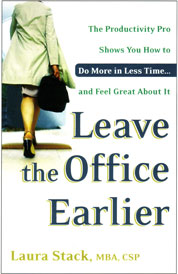
In Leave the Office
Earlier, The New York Times calls Leave the Office Earlier, "...the best of the bunch." The Library Journal, New York, NY named Leave the Office Earlier one of the "Best Business Books 2004"... Order this indispensable tool for the overworked and time challenged at Amazon.com and receive 20% off its retail price. More of The Productivity Pro's Resources |
|
|
| Laura in the News |
|
A look at a year's worth of columns Start as you mean to go on |
|
|
| Words of Wisdom |
|
"It's not enough to be busy. The question is: What are we busy about?" -- Henry David Thoreau "Do not seek to follow in the footsteps of the men of old; seek what they sought." -- Matsuo Basho, 16th century Japanese poet
|
| Where
in the World is Laura? |
|
January February March April May June July August November December June 2006 Visit Laura's Calendar On-line for her complete availability. |
|
||
|
|
||
| Contact
Laura: Phone: 303-471-7401 Email: [email protected] Web: www.TheProductivityPro.com |
| Feature Article |
Inch by Inch: Continual Productivity ImprovementPeople used to believe it was impossible to run a mile in less than four minutes. It was called the “Four-Minute-Mile-Barrier.” For many years, athletes tried to break this barrier, and no one could do it; in fact, there was a multitude of scientific evidence to support the fact that it couldn’t be done. Then in 1964, Roger Bannister, a British medical student, broke the barrier. As you’d suspect, it was a huge deal and made headlines in the world of sports. Guess what happened after he did it? Yep—a lot of people started doing the very same thing—five or seven athletes that year. Why? Simple: he had shown them the possibility and encouraged them to break through their own limitations. When you believe that something is impossible to do, you don’t even try, or you do it half-heartedly, so that when it doesn’t work given your low level of effort, you do what...say, “see, I told you I couldn’t do it.” “It’s impossible! I knew it was!” This is the famous self-fulfilling prophecy. If you think you can get better and be more productive, you can, and you will. Always think, “What if”? Take stock. Think about your daily tasks and ask some important questions. “How can I do this better next time?” “How can I be more efficient?” “How can I get these results with less effort?” Occasionally, you must take the time to stop, step back, and ask yourself these questions. You can’t just keep plowing ahead without occasionally regrouping and reassessing what you’re doing or have become blind to doing. Here are a few concrete and immediate ways to begin making changes: Sitting bombs. You’ve passed that magazine twenty times—you know, the one that has a great article for your mom—and keep telling yourself, “I need to send that article.” Do it now. Decide that, whenever possible, you will dispatch routine tasks immediately. If it takes less than three minutes, do it right then. Appointments. Your friend repeatedly cancels lunch dates at the last minute. This drives you crazy, but you continue to put up with it. Next time, don’t avoid dealing with the issue. If the person is important to you, explain how frustrated you are. Waiting time. It makes you nuts to have to continually wait for your doctor, who is always late (we must go to the same doctor). Instead, you decide you will make good use of this time and now carry notecards and magazines in your tote. Forgetfulness. At the end of the day, you had to rush out the door and leave that project half-done. You’re always frustrated, because when you return and look at the page, you can’t for the life of you remember what you were thinking or doing. Before quitting for the day, jot a few notes on a sticky note about where you left off and what your next step is. Post-vacation slam. You return from vacation and are so overwhelmed by your overflowing paper and email in-boxes, you’re more stressed out than before you left. Decide instead to return a day earlier, so you can get unpacked, do the laundry, and sort your mail. When something is bothering you, do a bit of introspection to see what’s going on and how you might approach it more efficiently or effectively next time. If you’re in a rut, and you’ve grown accustomed to low productivity, change may not be comfortable and change may not be easy. Take an honest look at your life, determine what’s no longer working, and change it.Make it a productive day! � |
|
|
| Hot Links |
|
Business impact of employee stress Create a vacation policy to avoid hurt feelings, lost productivity Lawmaker urges Bush to promote telework |
|
|
| Ask the Expert |
|
Dear Ms. Stack, I learned of your area of expertise through the MS Office "Work Essentials" CD that I recently received from Microsoft Corp. I've read most of the articles on the CD and viewed some of the templates, and they are all very good. I was hoping you might offer some insight on how best to arrange my day.
The major obstacle to keeping current with my work (besides the interruptions from my high maintenance boss) is that my boss insists that I do a little bit of everything each day (she calls it "keeping the plates spinning") instead of working on one task to completion. I've been doing things "her way" for several months now, but I'm beginning to understand that this is very stressful for me. It generally means that there is almost never a time when I can say that my work for the day is "complete" -- it's always carried over to the next day. For instance, If I'm in the middle of one portion of a long-term project that perhaps has a deadline, and I have to stop what I'm doing because it's "time to switch plates," or because my boss interrupts me to work on something new, I sometimes can't get back to my original task until a couple of days later -- if I don't forget completely -- because the same scenario occurs day after day! That puts me behind, and if I’m not careful, sometimes in danger of missing important deadlines. I know that there are times when it is absolutely necessary to interrupt current tasks for “special” emergencies, phone calls (in addition to my own incoming calls, my boss expects me to screen her calls), etc. I already schedule times to read and respond to email messages, but I am not allowed to let the phone go to voice mail because the call may be for her. If you can offer any suggestions, I'd really appreciate it. I've tried coming in early and staying late, but we are not authorized for overtime so it's all "gratis" -- which just adds to the frustration and stress levels. The other admins in my office (there are 4 of us, each working for one boss each) don't seem to have this problem. Is it something I'm doing wrong? Can you help? Thanks much. Janet A: Janet, You need to have an honest dialogue with your boss about how her habits are affecting your productivity. The ten interruptions a day for trivial things, constantly reprioritizing your work, can be handled through a communication log. Meet with her and ask her if you could try a different technique for delegating work. Emergencies aside, of course, ask her if she would write things down as she things of things to tell you on a piece of paper or build an email throughout the day. Then plan to get with her once or twice a day at a set time if possible, to review her list and prioritize your time for the day. I would also spend some time defining your responsibilities with her. If you listed the top ten things you think you’re responsible for and had her do the same for you, would your lists be different? If so, you are spending your time on things she doesn’t consider important. Instead of being so focused on tasks, focus on responsibility. If you get can her to work with you on rank-ordering the relative importance of each of your responsibilities, you may be able to eliminate many different tasks you’re currently doing that support low-priority responsibilities. If possible, don’t work on every project every day. If you’re doing 15-20 tasks for 6 projects every day, you’re only getting a few minutes for each one, not nearly enough to do quality work. I’d spend a more significant piece of time focusing on a specific project. Your boss needs to understand that “keeping the plates spinning” daily in this way isn’t productive and doesn’t produce quality work. Tell her I said so! I’d also spend some time with the other admins to see what they’re doing differently that works. Good luck, Laura |
| Letters to the Editor |
Laura, Thanks for the nutrition bits. Don't forget the most important proteins: beans and lentils, which are slow burners with carbs and fiber. Get Beano enzymes for the desk if you need and you are good to go all day. Lentils also have iron that is efficiently used by the body. So treat yourself to Indian or Mexican guilt-free! Robyn Lydick Laura, I have a suggestion about grocery lists that has worked very well for my family for years. We don't make a list from scratch, we check off an already made list. I have a document with every regular item we buy in three columns. Whenever something runs out, we just check off the item. The best part is that when I’m ready to go shopping, I can look through the list and see what we forgot to check off. No more looking at a blank sheet and drawing a blank about what we might be out of. I just print off a new sheet after each shopping trip. Jennifer (Jenna) Obee |
|
|
| Featured Seminar: |
|
COMPLIMENTARY WEB CAST WITH LAURA STACK HOSTED BY MICROSOFT ON JANUARY 25, 2006, 11:00-12:00 EST Microsoft Office System Webcast: Increase Your Efficiency, and Leave the Office Earlier with Tips from Work Essentials (Level 100) This Microsoft Office Work Essentials webcast offers tools and techniques to help you increase your efficiency at work by showing you how to get the most out of your Microsoft Office System software. Learn how to automate repetitive tasks, and find out how to use customizable templates to finish your work faster. We also show you software shortcuts, little-known filters, and other features and processes that can help you leave the office earlier. |
 Laura Stack, MBA, CSP Publisher |
||
| Message from Laura | ||
Happy New Year! What are your productivity resolutions for 2006? You might just be stuck in a rut. You get into a certain routine and have fixed habits that are hard to break. You know you�re not performing up to your ability, but hey, you�re getting by, so it�s good enough. Break out of that fix you�re in! Your beliefs are self-limiting. You can always do better than you are now. This month�s article gives you some ideas to start on your most productive year ever!
|
||
|
|
||
|
||
|
|
||
| Copyright & Reprint Information | ||
|
© 2006 Laura Stack, MBA, CSP. All rights reserved. Portions of this newsletter may be reprinted in your organization or association newsletter, provided the following credit line is present: "Laura M. Stack, MBA, CSP, is "The Productivity PRO!"® and the author of Leave the Office Earlier. She presents keynotes and seminars on time management, information overload, and personal productivity. Contact Laura at 303-471-7401 or visit www.TheProductivityPro.com." |
||
